PC keys shown in the game HUD
The table follows the PC labels visible in Iron's Morioh High showcase at 0:05. Barrage, skill and withdrawal are shown while a Stand is active. Match the action on your own HUD when your character changes state.
| Input | Displayed action | When to check it |
|---|---|---|
| LMB | Light attack | Your normal attack prompt |
| RMB | Stand barrage | With your Stand active |
| F | Block | During combat |
| Q | Dash | During movement or combat |
| Ctrl | Lock | Read the current Lock prompt |
| Z | Withdraw Stand | With a Stand already out |
| X | Stand skill | The skill depends on your Stand |
| C hold | Voice | Available features depend on the current game and account |
| M | Menu | The left-side game menu |
LMB and RMB mean the left and right mouse buttons. The source frame labels Ctrl as “Lock”; use the current game prompt to see how it behaves in your session.
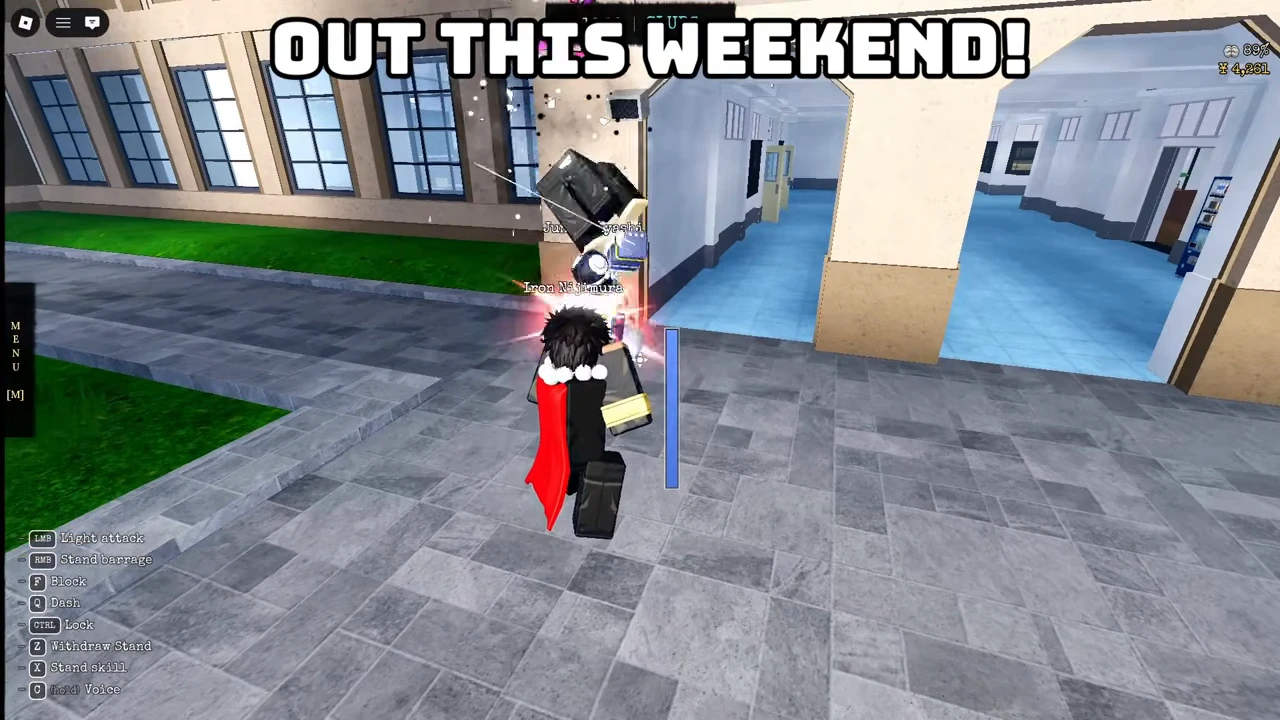
When your Stand is active
Use the displayed barrage and skill inputs to learn your kit. Start by trying a single skill, then watch how the action changes as its effect ends. Withdraw the Stand using the active-Stand prompt when you need to manage your next exchange.
The Stand directory lists signature skills and roles. If you are still unawakened, use the first-Stand guide before comparing active-Stand controls.
As a practice routine, learn your movement and defense before adding multiple attacks. Stop after one action, observe its range and return to a safe position. These are learning suggestions rather than a guaranteed combo.
The held voice prompt
The recorded HUD labels held C as Voice. This is a label in the source footage, not a guarantee that every account can use the feature. Follow the options the Roblox experience actually offers to your account and device.
Keep using the visible keyboard controls for actions you can perform directly. For microphone or account eligibility issues, use Roblox's support resources rather than sharing account credentials with a fan site.
See the inputs in gameplay
The release-week showcase demonstrates Stand actions. Your current game HUD is the reference for changed inputs.